On This Page
Viewing Cisco ACI Applications in SecureApp
This is a Legacy Feature. This feature will not be available in TOS Aurora.
The Cisco Application Centric Infrastructure (ACI) has two modes for deploying architecture: network centric and application centric. Network centric mode is a more traditional mode intended for gradual transitions into using ACI architecture, which enables the existing network architecture and flows to remain unchanged. Application centric mode is a newer approach that allows application requirements to define the network, and comes with an architecture that simplifies, optimizes, and accelerates the entire application deployment life cycle.
If you are using ACI in application centric mode, you can create an integration which will enable Tufin to import Cisco ACI Tenants and Application Profiles automatically into SecureApp and display them as connections between the end points, thus reflecting the contract and providing full definition of the application in the TOS system.
Security managers can define connectivity restrictions in Tufin’s Unified Security Policy. Once defined, they can run compliance checks and see any violations. SecureApp shows how each application conforms or deviates from the policy.
How Tufin Integrates with Cisco ACI
When you add Cisco ACI to SecureTrack monitoring, Tufin learns the tenants, then the application profiles, the contracts, and the EPGs.
After that, it creates a mirror of the ACI application profiles in SecureApp, Tufin’s application connectivity solution. Thus, each Cisco ACI application profile is automatically added as a SecureApp application, along with the relevant tenants. The Cisco ACI contracts are shown in each application as connections.
To ensure that all SecureApp connections accurately reflect the Cisco ACI contracts, the Cisco ACI applications are read-only and are blocked from creating SecureChange tickets.
Tickets and changes only apply to the monitored firewalls: They are not supported for the ACI fabric.
When a new revision is received from Cisco ACI, the Cisco ACI applications and connections in SecureApp are removed and replaced by the latest profiles and contracts.
ACI and SecureApp Concepts
This table presents some of the key ACI policy constructs and how they are presented in Tufin Secure App:
|
Cisco ACI |
Description |
Tufin |
|
Application Centric Infrastructure (ACI) |
The Cisco Application Centric Infrastructure (ACI) allows application requirements to define the network. This architecture simplifies, optimizes, and accelerates the entire application deployment life cycle. |
SecureApp |
|
Application Policy Infrastructure Controller (APIC) |
The Cisco Application Policy Infrastructure Controller (APIC) API enables applications to directly connect with a secure, shared, high-performance resource pool that includes network, computing, and storage capabilities. The APIC:
Data center operators can clearly see how applications consume network resources, easily isolate and troubleshoot application and infrastructure problems, and monitor and profile resource usage patterns. |
TOS |
|
Tenant |
A tenant:
|
Included in SecureApp application and security rules in SecureTrack
|
|
Endpoint group (EPG) |
A logical entity which contains a collection of physical or virtual network end-points. EPGs can represent collections of applications, or application components and tiers, and can be used to apply forwarding and policy logic. In ACI, endpoints are devices connected to the network, directly or indirectly by means of a managed or unmanaged virtual switch. They have an address (identity), a location, attributes (for example, VM-level attributes, Kubernetes Labels, and so on), and can be physical or virtual. Endpoint examples include physical servers, virtual machines, storage arrays, Linux containers, or clients on the Internet. This grouping is independent of addressing, VLAN, and other network constructs.
|
Groups and group members |
|
Contract |
The rules that specify what and how communication in a network are allowed between EPGs. In ACI, contracts link EPGs and contain the policies that govern the communication between EPGs: The contract specifies what can be communicated and how it can be communicated, and the EPGs specify the source and destination for the communications. |
SecureApp connection |
|
Filters |
Filters are Layer 2 to Layer 4 fields. According to its related contract, an EPG provider dictates the protocols and ports in both the in and out directions according to its contract. Contract subjects contain associations to the filters (and their directions) that are applied between the EPGs that produce and consume the contract. Each filter has assigned Source and Destination ports |
Service (IP Protocol type: TCP, UDP, ICMP) Service Group (for filters containing other types) |
|
Application profile |
An application profile models application Application profiles contain one or more EPGs. Modern applications contain multiple components. For example, an e-commerce application could require a web server, a database server, data located in a storage area network, and access to outside resources that enable financial transactions. The application profile contains as many (or as few) EPGs as necessary that are logically related to providing the capabilities of an application. |
SecureApp application and security rules in SecureTrack (in the source/destination) |
From Cisco ACI to Tufin SecureApp
After you add Cisco ACI to SecureTrack monitoring, all of the application profiles in the Cisco ACI tenants are shown in SecureApp as separate applications.
|
Cisco ACI Application Profile |
SecureApp Application |
|
|
|
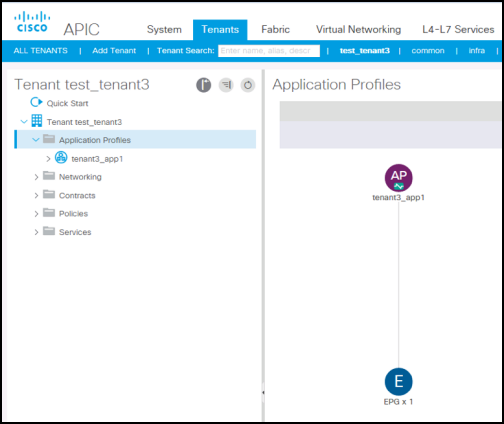
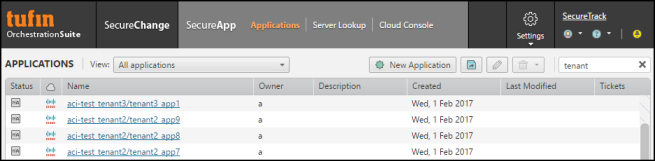
You can click on the name of an application to see the Cisco ACI contracts.
|
Cisco ACI Contract |
SecureApp Connections |
|
|
|
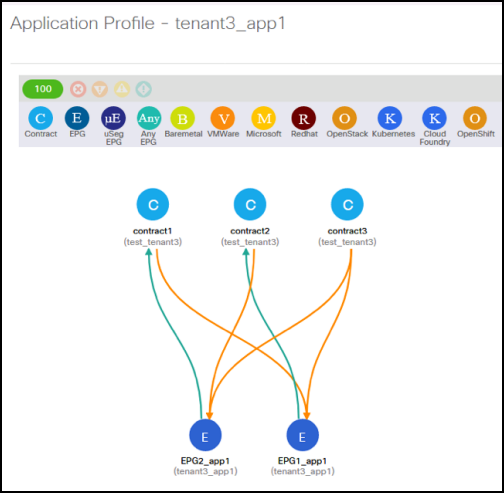
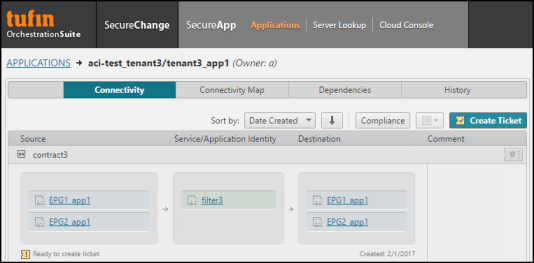
The connection shows all of the servers and services of the contract as groups.
|
Cisco ACI Service |
SecureApp Service |
|
|
|
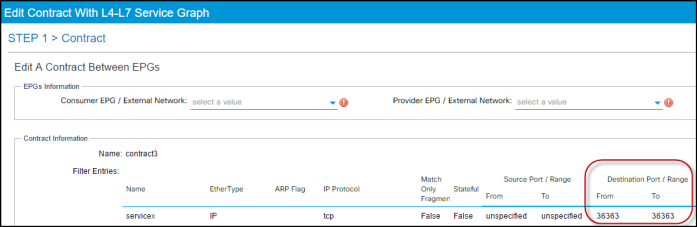
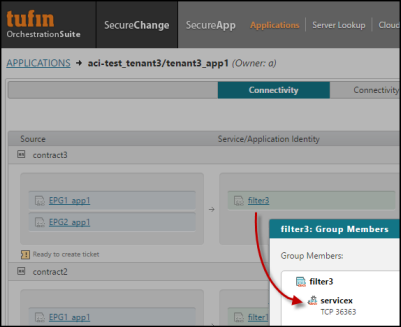
SecureApp services support destination ports only.