On this page
Creating an Application
Overview
An application has properties, including name, owners, editors, and viewers. You configure the connectivity requirements that include all of the connections the sources, protocols and destinations of network traffic.
Create an application
-
Click
 .
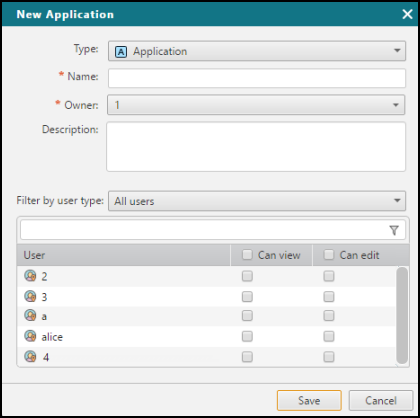
. The New Application dialog appears.
-
Select or enter the following information:
Field
Value to enter or select
Type
(for multi-domain mode only)Select Application
Name
Enter the name of the application pack
Description
(optional) Enter a description
Owner
(optional) If you have permissions to assign an Owner to the application pack, select the SecureApp user who will be responsible for the application. The application owner can view and edit the application's connections and resources.
Select Editors or Viewers
(optional) From the list of users, manage which additional users can view or edit the application's connections or resources.
Filter the users displayed in the user list using the filter options displayed in the dialog.
-
Click Save.
The new application or application pack opens. You can now manage its resources and connections.
How do I get here?
SecureApp > Applications
Was this helpful?
Thank you!
We’d love your feedback
We really appreciate your feedback
Send this page to a colleague