On this page
Managing Zone Hierarchy
Overview
After configuring network zones, you can create zone hierarchies from the zone list. A zone hierarchy lets you group network zones under a parent zone. The parent zone represents all the networks of its member (child) zones, so you can write and audit your security policy against a small number of parent zones while your network stays divided into as many member zones as you need. For example, a USP that references six parent zones can govern dozens of member zones, each of which you still define, monitor and troubleshoot individually..
This topic describes how to manage zone hierarchies from SecureTrack. You can also create a CSV with zone hierarchies and import it in to SecureTrack.
Why use zone hierarchies
-
Manage a large network with fewer USP rules
Define one USP rule for the parent zone instead of repeating it for every sub-zone. When you add a new member zone to a parent, existing parent-level policy covers it.
The matrix grows with the number of zone pairs, so grouping keeps it small enough to read and audit, and cuts duplicate violations — while each member zone keeps its own subnets and granularity.
-
Cover new zones automatically
When you add a member zone to a parent, existing parent-level policy applies to it.
-
Match how your organization is structured
Group by business unit, site, environment or compliance scope.
See:
Creating zone hierarchies and managing zone hierarchy membership
Examples of zone hierarchies
Common ways to structure zone hierarchies:
-
Departments
Create a zone hierarchy for a department whose sub-zones share the same compliance needs, so you can apply one policy to the whole department. For example, HR as the parent zone of HR-Internal, HR-External, and HR-Remote. A single USP rule uses HR instead of the three member zones.
-
Compliance regulations
Create a zone hierarchy for each compliance zone that a regulation requires to apply the regulation's rules to every zone in scope. For example, for PCI DSS, PCI Data as the parent zone of Payment-DB-NY and Payment-DB-London. A USP rule that blocks traffic from the Internet zone to PCI Data covers both member zones.
-
Environment separation
Create a zone hierarchy for each environment to control traffic between environments instead of between individual applications. For example, Production, Staging, and Development are parent zones, each with its own application zones as children. One USP rule blocks traffic from Development to Production.
-
Geography
Create a zone hierarchy for each region to apply regional policy, such as inter-site access or data-residency rules. For example, EMEA as the parent zone of London-DC and Frankfurt-DC, and Americas as the parent zone of NY-DC. One USP rule controls traffic between EMEA and Americas.
Alternatively, create a zone hierarchy per site for a region. For example, London-DC as a parent of London-Web and London-DB.
Create a zone hierarchy
Create a zone hierarchy by defining a parent zone and its member zones. The same zone can be a member zone of multiple parent zones.
You can add the predefined Users Networks zone to a zone hierarchy, either as parent zones or as member zones.
Prerequisites
Steps
-
Go to SecureTrack > Browser
 > Zones .
-
Click Zone Hierarchy.
-
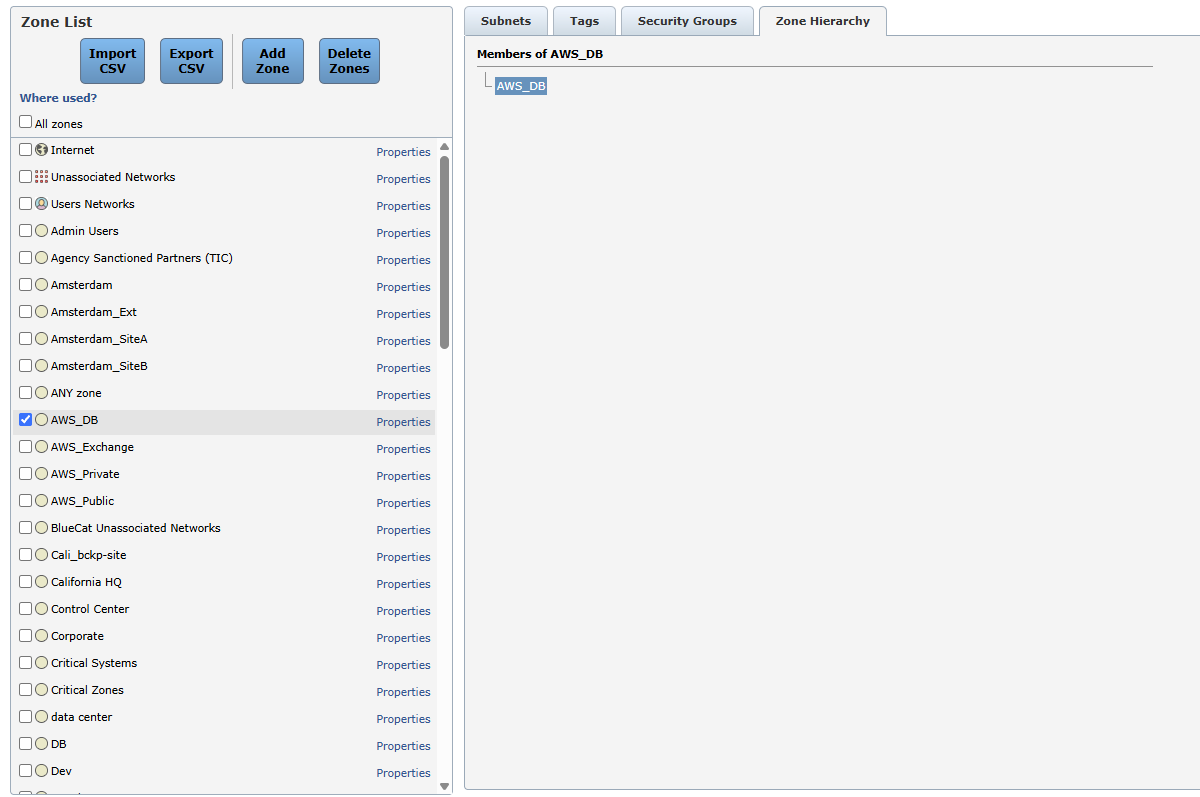
From the Zone List on the left, select the zone that represents the parent zone for the hierarchy.
The zone appears as the root of the hierarchy tree.
-
To add members to the zone hierarchy, do the following:
-
Click the parent zone name in the Zone Hierarchy tab.
-
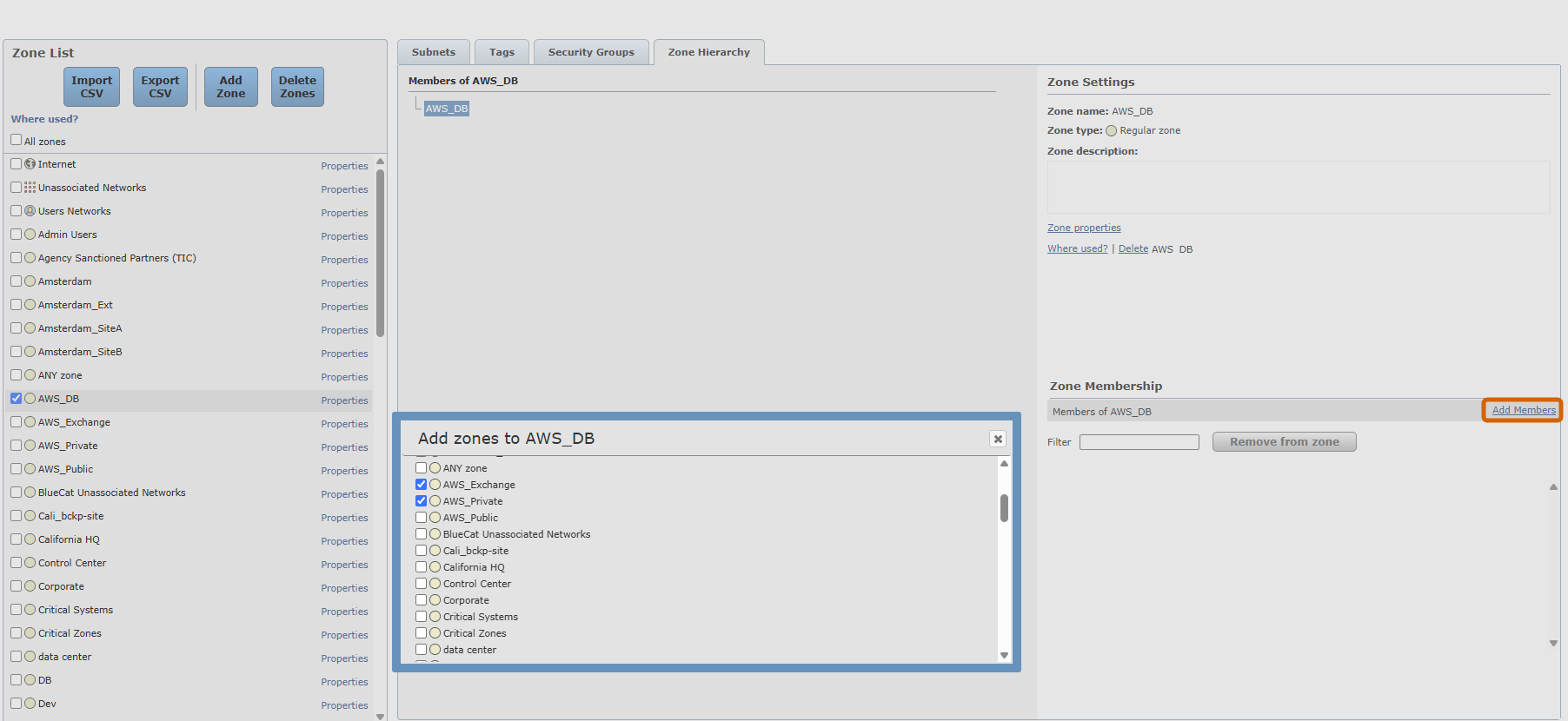
In Zone Membership, click Add Members.
-
If needed, to filter the zone list, type part of the zone name.
-
Select one or more zones to add as members.
-
Click Add selected zones.
The Members of <zone> list displays the new member (child) zones.
-
Manage zone hierarchy membership
After defining a zone hierarchy with member zones, you can update it by adding more members to the parent or member (child) zones, or by removing existing members. Removing a zone automatically removes all nested member zones. The Zone List remains unchanged.
-
Go to SecureTrack > Browser
> Zones . -
Click Zone Hierarchy, and select the parent or child zone.
-
Under Zone Membership, do one of the following:
-
To add members, click Add Members, select the zones to add, and then click Add selected zones.
-
To remove the selected parent or child zone, click Remove from zone.
This action removes the selected zone and any member (child) zones belonging to it.
-
Related topics
Was this helpful?
Thank you!
We’d love your feedback
We really appreciate your feedback
Send this page to a colleague