On This Page
Creating a Rule Recertification Workflow
Overview
RLM uses the Rule Recertification workflow to certify or decertify rules based on Rule Owners' decisions.
This workflow must have at least three steps, with only a Rule Recertification field in each required step.
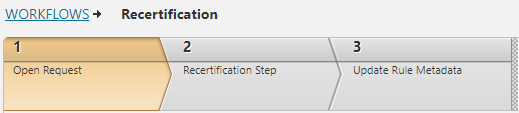
-
Step 1 opens the ticket.
-
Step 2 sets the recertification decision.
-
Step 3 implements the certification decision by updating the rule metadata.
The App Administrator can enable RLM to update the rule metadata automatically or allow a Handler to update this information manually.
-
If automatic, this workflow must contain exactly three steps with only a Rule Recertification field, and no other fields, in each step.
-
If manual, the workflow can contain more than three steps and include additional fields, besides the mandatory Rule Recertification field, in the third and subsequent steps.
Prerequisites
Request the Login username for the SecureChange user, which the App Administrator defined in the Settings tab, and assign all required steps in the workflow to this user.

Create the Workflow
-
Create Step 1 to open and submit the ticket. This is a required step and must include a rule recertification field.
RLM passes the Rule Owner's certification decision to the rule recertification field in this step.
-
Create Step 2 to recertify the rule. This is a required step and must include a rule recertification field.
RLM virtually clicks the Certify or Decertify button, as specified by the Rule Owner.
-
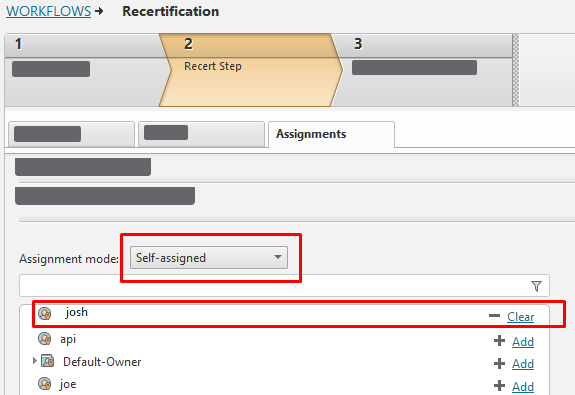
Set the Assignment mode to Self-assigned. You can only assign a single user, who is the same user defined in the SecureChange section in the Settings tab.
-
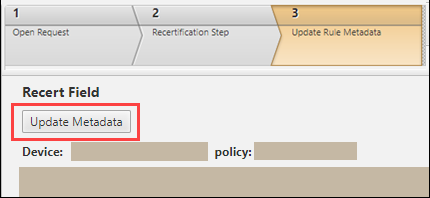
Create the last step to update the rule metadata. This is a required step and must include a rule recertification field.
-
If the App Administrator configured RLM to update rule metadata automatically, this step must be Step 3 and no additional steps are allowed in this workflow.
-
If you need additional steps in your workflow, you can add them after Step 2. Additional steps can contain fields other than the rule recertification field and be assigned to users other than the SecureChange user defined in the Login username field in the Settings tab. RLM monitors the progress of the rule continuously and waits for the Handler to update the rule metadata manually.
-
