On this page
Managing Certification Decision Conflicts
Multiple Rule Owners could disagree about the certification decision for a rule. For example, one Rule Owner wants to certify their network objects in the rule and another Rule Owner wants to decertify their network objects in the rule.
The Rule Lifecycle Management App (RLM) identifies these rules, marks them with the Conflict status, and automatically adds the Mediator Group to the rule. This group of administrative users is responsible for mediating tickets for which Rule Owners disagree about the certification decision.
While a rule has the status Conflict, any Rule Owner can submit a new decision which overrides the previous one.
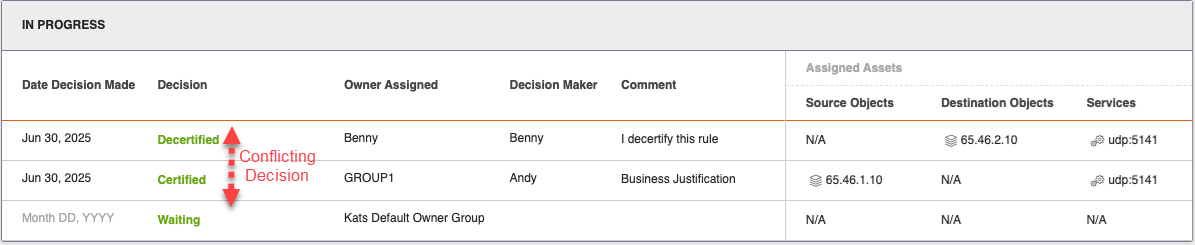
Options for resolving a conflict
Rules with Conflict status can be resolved as follows:
-
Come to consensus: All Rule Owners, including the Mediator group, reach a consensus and submit new decisions that agree. They can all do this from the Pending page.
-
Override certification decision: Once all Rule Owners have submitted a decision, including the Mediator group, if there is still a conflict, the Mediator group can decide independently whether to certify or decertify the rule. This decision overrides the decision of dissenting rule owners, and their certification decision is updated accordingly.
-
Modify the rule: There are two options for modifying the rule.
Mediator Group opens a Rule Modification ticket in SecureChange to add or remove an asset, or modify a group. This is limited to specific vendors. See SecureChange Features by vendor.
Once a rule has been successfully modified, SecureTrack must receive a revision. Either manually initiate a new revision search from SecureTrack, or wait for the revision to be pulled according to the cycle configured in SecureTrack. After SecureTrack receives the revision, the Default Owner can select Import Rule for Partial Mapping, and a one-rule scan will be executed. The rule is then nominated for a fresh certification, clearing the rule conflict in RLM.
-
Opening a rule modification ticket in SecureChange add or remove an asset, or modify a group. This is limited to specific vendors. See SecureChange Features by vendor.
-
Manually modify the rule on a device.
Once a rule has been successfully modified, SecureTrack must receive a revision. Either manually initiate a new revision search from SecureTrack, or wait for the revision to be pulled according to the cycle configured in SecureTrack. After SecureTrack receives the revision, the Mediator Group can select Import Rule for Partial Mapping, and a one-rule scan will be executed. The rule is then nominated for a fresh certification, clearing the rule conflict in RLM.
-
Resolve conflict by modifying a rule in SecureChange
This procedure can only be performed by the Mediator on rules with the Conflict Status.
-
From the Actions (
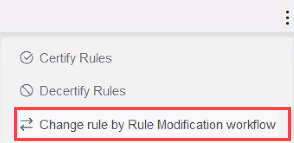
 ) list, select Change rule by Rule Modification workflow.
-
Wait for a revision to be received in SecureTrack (or initiate a manual pull).
-
From the Actions (
) list, select Import Rule for Partial Mapping. RLM will initiate a scan for the individual rule and the rule will be nominated for a new certification.
RLM opens a new rule modification ticket in SecureChange, which can be viewed in the Tickets page.
When this ticket opens, RLM also updates the rule status in RLM to Pending Modification and adds a link to the SecureChange ticket in the rule.

