On this page
Revision History
Overview
The Revision History page displays policy revisions for a selected device, and provides change-tracking capabilities for the security policy. A revision is a snapshot of a device's security and networking configuration.
Revision History displays revisions that are related to security issues. Revisions that only contain changes of a non-security nature, such as Global configuration, NAT rules, interface descriptions, and routing changes, will either appear with no rules or will be omitted. Skipping results in non-sequential revision numbers.
What can I see?
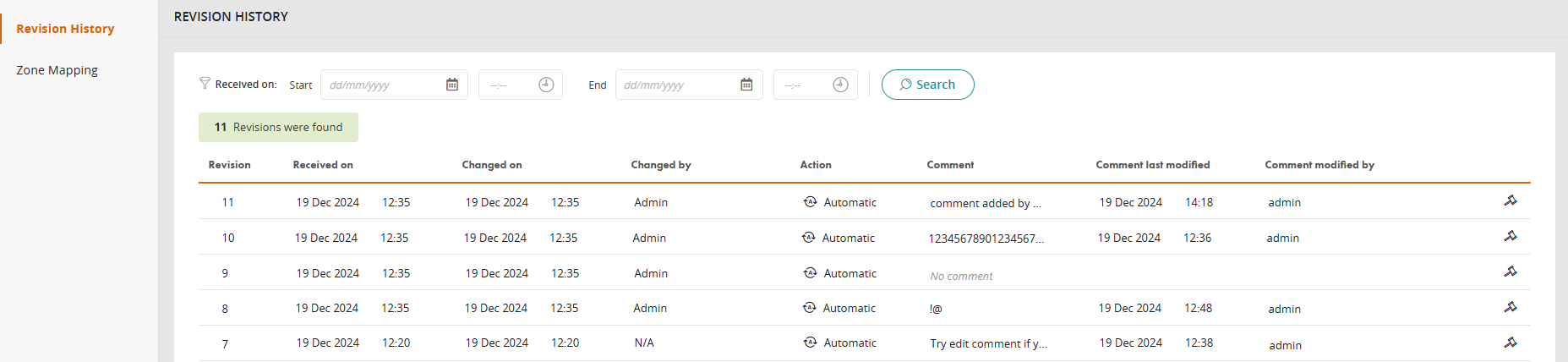
For the selected device in the Device Viewer (not including firewall devices), this page shows a list of all revisions.
-
The columns include:
-
Revision: Revision number assigned by SecureTrack.
-
Received on: Date and time when the revision was received in TOS.
-
Changed on: Date and time when the revision was created on the device.
-
Changed by: User who updated the revision.
-
Action: Operation on the device that generated the new revision. Possible values include: Unset, Auto, Save, Install, Restore, Remove, Assign and Install, and Rollback.
-
Comment: For OPM devices, use this field to add/modify comments. For non-OPM devices, you can add/modify comments in the Compare Revisions page. Comments are limited to 1024 alpha-numeric characters; they cannot include special characters.
-
Comment last modified: Date and time for the most recent comment modification.
-
Comment modified by: Name/ID of the user who last added or modified the comment. (For example, John Smith (jsmith))
-
Click
 to open the rule in the Rule Viewer.
-
What can I do here?
Filter results
Use the filter row to limit the results.

-
Select a Start and End date/time.
-
Click Search.
The revisions for the selected time frame appear.
View rule changes
See Rule Changes.
How do I get here?
SecureTrack > Monitoring  > Device Viewer
Select the device.
Was this helpful?
Thank you!
We’d love your feedback
We really appreciate your feedback
Send this page to a colleague