On This Page
TufinMate for IT User Guide
Overview
TufinMate's command syntax is flexible, allowing you to speak naturally as you request details regarding access flows and devices in your environment. You can also request PDF reports and open SecureChange tickets.
This user guide is organized by query type and takes you through the best practices for interacting with TufinMate successfully and efficiently.
Access Related Questions
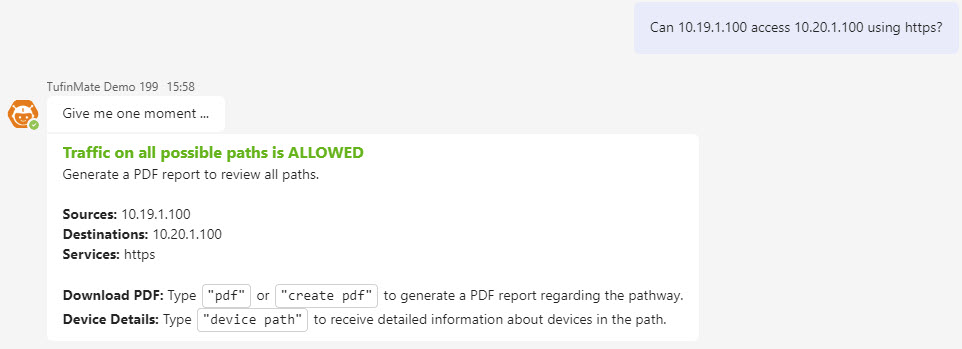
TufinMate can tell you whether access is permitted between two end points in your network. It considers whether the access uses a specific port or service to traverse the path. Supported end point formats include lone IP addresses, subnets or CIDR blocks, and FQDNs.
The following table includes some examples of supported question formats.
Sample Question Formats
|
Access type |
Sample query |
|---|---|
|
IP to IP via a specific service |
Can 10.11.1.111 access 10.22.2.222 using https? |
|
IP to IP via a specific service - policy path |
Find the policy path between the source IP 100.100.0.1, destination IP 10.0.0.2, and service HTTP |
|
Subnet to the internet via a specific service |
Can 111.123.3.0/24 access 8.8.8.8 using https? |
|
IP to FQDN via a specific protocol and port |
Can you tell me if 12.123.123.1 can access dns.google.com via tcp:53? |
|
Subnet to subnet |
Show me the traffic between 10.100.1.0/24 and 10.100.99.0/24. |
111.111.111.0/24.Generate PDF Topology Report
TufinMate generates PDF reports detailing access flows from your topology.
After requesting a PDF report, you will be prompted to allow the file to be uploaded to your OneDrive:
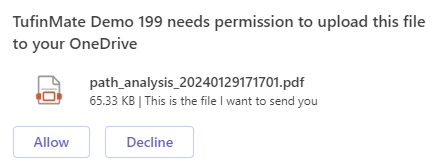
Click Allow to continue.
The file is sent to the OneDrive account associated with your user name. It will not be shared with anyone else in your organization.
You can request a report for any query supported in Access-Related Questions.
Sample Question Formats
|
Report type |
Sample query |
|---|---|
|
Path from source to destination via a service |
pdf for source IP 1.1.1.0/24 and destination IP 192.100.10.0/24 via https |
|
Path described in a previous query |
After asking an Access-Related Question, type pdf or create pdf to see a report of the access details. |
View Devices on a Path
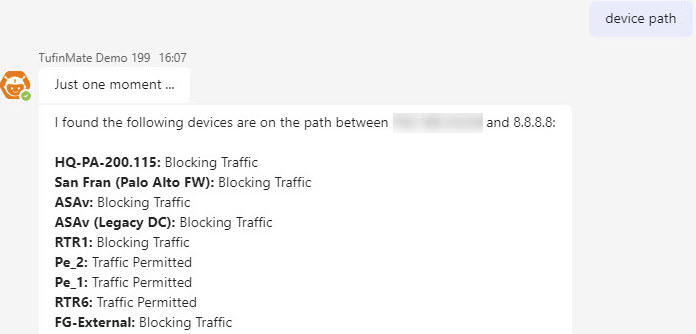
TufinMate shows you which firewalls exist on the path between a given source and destination. You can view these devices for any query supported in Access-Related Questions.
Sample Question Formats
|
Query type |
Sample query |
|---|---|
|
Devices between a source and destination via a service |
device path between 10.19.1.100 and 10.20.1.100 using https? |
| Device path based on a previous query |
After asking an Access-Related Question, type device path. |
Open a SecureChange Ticket
If an access path is blocked, you can ask TufinMate to open a SecureChange ticket to open it. TufinMate will use your identity to populate the ‘Requester’ field of the ticket.
Restrictions
-
TufinMate requires you to have a SecureChange account before opening a ticket on your behalf.
-
To prevent the creation of redundant policies or rules, TufinMate informs you when another user has already requested the access flow you want to open.
-
TufinMate will not provide another user’s access request ticket details, even if they relate to the flow you asked about. To see those details, view the request from SecureChange's Requests page.
Sample Question Formats
|
SecureChange ticket type |
Sample query |
|---|---|
|
Open access between two subnets via a service |
Allow traffic from 111.111.111.0/24 to 111.222.11.0/24 via service, tcp2. |
|
Open access between two subnets via any service |
Allow any service from 111.111.111.0/24 to 111.222.11.0/24. |
|
Open access between two subnets via any service - alternative phrasing |
Open a ticket to allow access between 111.111.111.0/24 and 111.222.11.0/24. |
Check the Status of a Ticket
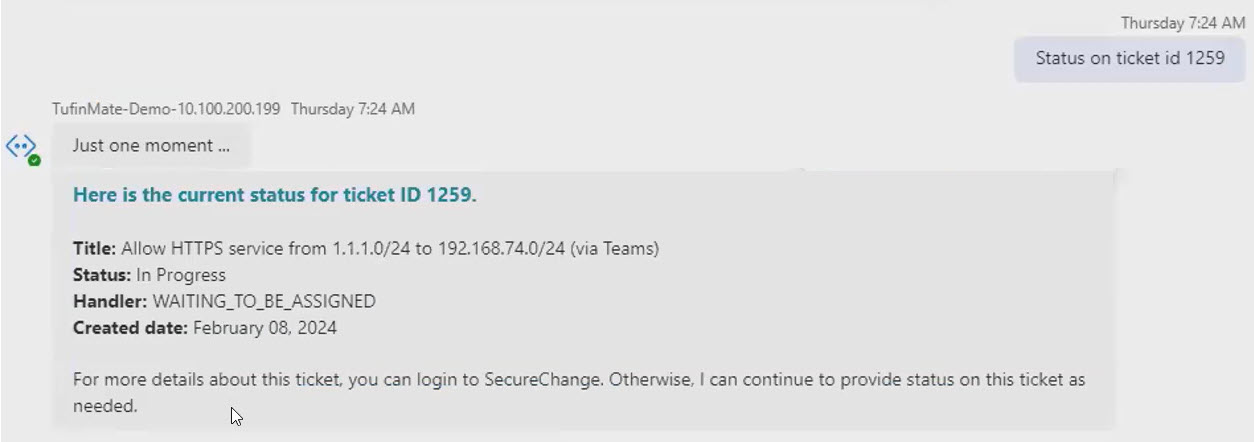
After creating a ticket, you can ask TufinMate to check its status.
Sample Question Formats
|
Query type |
Sample query |
|---|---|
|
Learn ticket status via ticket ID |
Status for ticket 1259 |
Known Limitations
|
Limitation Area |
Description |
|---|---|
|
Internet objects |
TufinMate can't parse the word "internet." When referring to the internet, use a proxy like "8.8.8.8." For example: Can this asset access 8.8.8.8? |
|
IPv6 addresses |
IPv6 addresses are not supported. |