On this page
Customizing Access Requests
Overview
An administrator can change the options available to users in any Access Request field, in Settings > Access Request. These options affect all tickets.
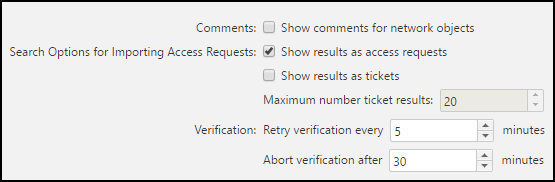
Customize access requests
Comments
You can select Show comments for network object for the access request to display network object comment fields in tooltips and to search for comment text.
Topology intelligence
If your devices have topology enabled in SecureTrack, SecureChange can use the topology information to improve the results of:
- Verification
Importing ticket information
When users search for closed tickets' access requests for importing, SecureChange can display results in either or both of these ways:
- Show results as access request
- Show results as tickets. You can also specify the Maximum number of ticket results to display.
Verification - ticket verification time
At the end of every step configured for access request verification, auto-verification occurs. You can set:
- Retry verification every: How frequently SecureChange attempts to verify the access request change.
- Abort verification after: How long SecureChange attempts to verify the access request change. If the verification fails, the handler can manually verify the change.
How do I get here?
SecureChange >  Settings > Access Request
Was this helpful?
Thank you!
We’d love your feedback
We really appreciate your feedback
Send this page to a colleague