On This Page
Rule Owner: Recertifying Rules
The Rule Lifecycle Management App (RLM) orchestrates the process of identifying rules that you, the Rule Owner, need to recertify. Using the app, you make a certification decision, which is passed along for either automatic or manual implementation.
How Does It Work?
The workflow is as follows:
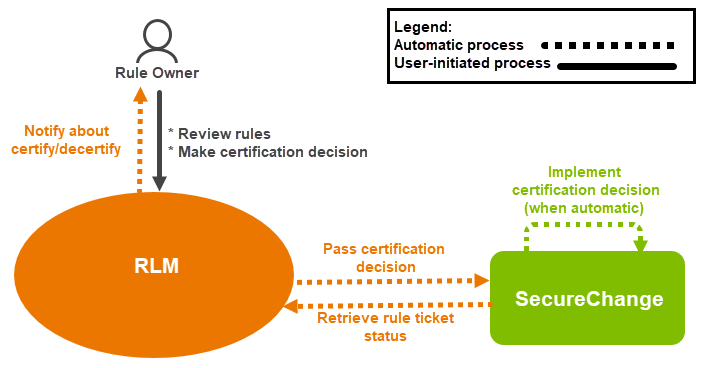
- After collecting all rules that will expire, or have already expired, RLM notifies you about rules that require your certification decision. These rules appear in the My Queue tab.
- Once you review the rules and make a certification decision, the rules move to the Pending tab to await implementation of your decision.
The device IP, source IP and destination IP parameters determine the owners who are responsible for a rule.
Use Case 1: Rule Owner has sole ownership of a rule
Alice is the sole Rule Owner for these assets: 1.1.1.1, 2.2.2.2, and 10.10.10.0/24. Alice makes the certification decision for a rule with the information that is on Device IP 10.10.10.100, Source IP 2.2.2.2, and Destination IP 1.1.1.1. The rule then appears on her Pending tab.
Use Case 2: Multiple owners possess partial responsibility for a rule
Alice owns assets 1.1.1.1 and 10.10.10.0/24 and Bob owns asset 2.2.2.2. A rule with information that is on Device IP 10.10.10.100, Source IP 2.2.2.2, and Destination IP 1.1.1.1 requires a certification decision. Both Alice and Bob will see this rule waiting for approval in their Pending tab and both Alice and Bob must make a certification decision. If Alice wants to certify the rule and Bob wants to decertify the rule, the Default Owner Group is added to the rule, and the rule modification option becomes available (if the workflow supports the device) for the rule. If the decision is to modify the rule, the administrator will contact Alice and Bob, agree on a decision, and modify the rule in SecureChange. RLM updates the rule status in the Pending tab.
Use Case 3: An owner, or multiple owners, are not fully responsible for a rule
Alice owns assets 1.1.1.1 and 10.10.10.0/24 and Bob owns asset 2.2.2.2. A rule with the information that is on Device IP 20.20.20.100, Source IP 2.2.2.2, and Destination IP 1.1.1.1 requires a certification decision. Since neither Alice nor Bob have responsibility for the IPs for the rule, the Default Owner Group is added to the rule, and any member of that group will see this rule in their Pending tab.
For a complete explanation of the Rule Owner's processes, see the following topics:
