On this page
Set up Owner Settings
Overview
Owner mapping settings define how Rule Lifecycle Management App (RLM) maps owners to assets and the rules referenced in these assets.
-
Asset-based mapping is implemented according to the selected calculation method and the owner-asset mapping table.
-
Orphan assets are assigned to the Default Owner Group.
-
Certification conflicts are assigned to the Mediator Group.
You can assign the same group to both the Default owner group and Mediator group.
The App Administrator configures the mapping logic in Settings > Owners.
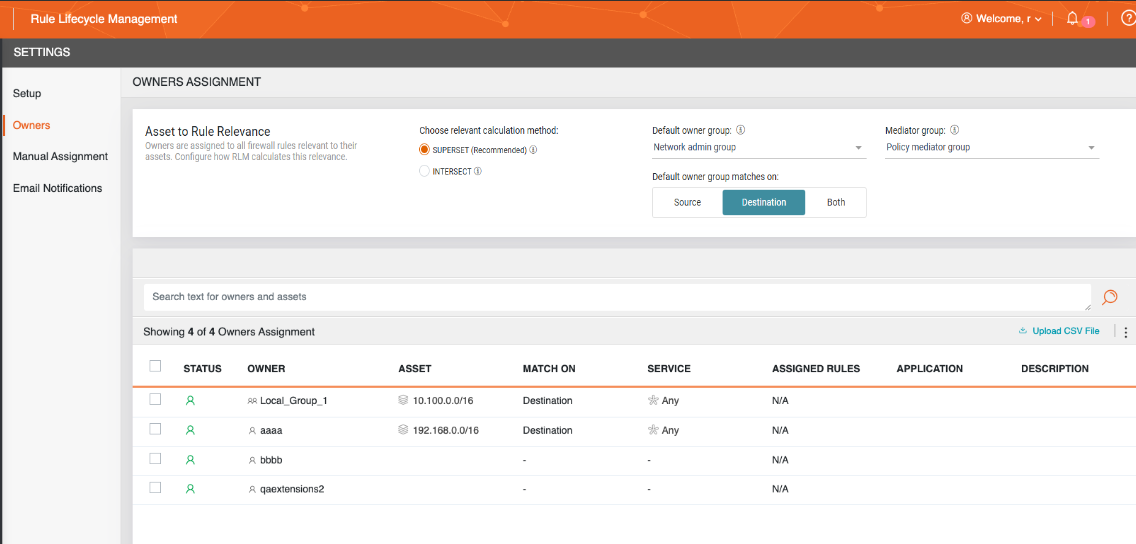
To manually assign owners to rules, see Manually map owners to rules.
Owner-asset calculation methods
Calculation methods determine how RLM matches an owner’s assigned assets to the objects in a rule.
Superset
The Superset algorithm is conservative. It assigns an owner to a rule when the owner’s asset fully contains at least one object in the rule's source or destination.
If an owner is assigned to a narrow subnet (for example, /32) in the mapping table, the owner is not assigned to rules that reference a larger aggregate block, even when the aggregate block includes the owner’s subnet.
Example
Scenario:
-
User A is assigned to the IP address 1.1.1.1
-
Rule contains a subnet 1.1.1.0/24
Result: Owner is not assigned to the rule.
Reason: The assigned asset (1.1.1.1/32) does not contain the rule object (1.1.1.0/24), although the host IP resides within the subnet.
The Superset algorithm requires the owner’s asset to be broader than, or equal to, at least one object in the rule.
Intersect
The Intersect algorithm is expansive. It assigns ownership when there is any IP-range overlap, even when the rule object is broader than the owner’s asset. This increases coverage, but can produce more multi-owner matches.
Example 1
Scenario:
-
User B is assigned to the host 1.1.1.1/32
-
Firewall rule references the subnet 1.1.1.0/24
Result: Owner is assigned to the rule.
Reason: The two networks overlap because the IP address 1.1.1.1 falls within the subnet’s range, although the assigned asset (1.1.1.1/32) does not contain the rule object (1.1.1.0/24). The Intersect algorithm assigns ownership whenever there is any overlap in the IP address space, even if not completely contained.
Example 2
Scenario:
-
User C is assigned to the subnet 10.20.30.0/24
-
Firewall rule references the subnet 10.20.29.128/23
Result: Owner is assigned to the rule.
Reason: The two networks overlap between 10.20.30.0 and 10.20.30.255, although the rule’s network is broader and extends beyond User C’s assigned range. The Intersect algorithm assigns ownership whenever there is any overlap in the IP address space, even if not completely contained.
Default owner group
The Default Owner group serves as the default assignee for orphan assets. All source and destination objects must have an owner. Any object left unassigned in the mapping table is considered orphaned and is assigned by default to this group.
You can limit how many times the Default Owner Group is assigned by restricting its scope to orphan assets on the source or destination.
Mediator group
If two owners submit conflicting decisions for a rule during certification, RLM assigns the Mediator group to the conflicted rule based on the conflict scenario.
-
Scenario 1: Two owners are assigned to the same asset.
-
Scenario 2: Two owners are assigned to different assets in the rule.
-
Scenario 3: Two owners manually are assigned to the rule, and both owners have full authority over the rule.
In all scenarios, one owner certifies and the other owner decertifies the rule.
Conflict resolution methods
Rules with Conflict status can be resolved as follows:
-
Come to consensus: All Rule Owners, including the Mediator group, reach a consensus and submit new decisions that agree. They can all do this from the Pending page.
-
Override certification decision: Once all Rule Owners have submitted a decision, including the Mediator group, if there is still a conflict, the Mediator group can decide independently whether to certify or decertify the rule. This decision overrides the decision of dissenting rule owners, and their certification decision is updated accordingly.
-
Modify the rule: There are two options for modifying the rule.
Mediator Group opens a Rule Modification ticket in SecureChange to add or remove an asset, or modify a group. This is limited to specific vendors. See SecureChange Features by vendor.
Once a rule has been successfully modified, SecureTrack must receive a revision. Either manually initiate a new revision search from SecureTrack, or wait for the revision to be pulled according to the cycle configured in SecureTrack. After SecureTrack receives the revision, the Default Owner can select Import Rule for Partial Mapping, and a one-rule scan will be executed. The rule is then nominated for a fresh certification, clearing the rule conflict in RLM.
-
Opening a rule modification ticket in SecureChange add or remove an asset, or modify a group. This is limited to specific vendors. See SecureChange Features by vendor.
-
Manually modify the rule on a device.
Once a rule has been successfully modified, SecureTrack must receive a revision. Either manually initiate a new revision search from SecureTrack, or wait for the revision to be pulled according to the cycle configured in SecureTrack. After SecureTrack receives the revision, the Mediator Group can select Import Rule for Partial Mapping, and a one-rule scan will be executed. The rule is then nominated for a fresh certification, clearing the rule conflict in RLM.
-
Ownership removal
See Tracking Ownership Removal from Rules.
Configure default owner group and match scope
The Default Owner Group is used for orphan assets and for mediating rule certification conflicts.
-
Default owner group: Select any group with at least one member.
-
Default owner group matches on: Define where RLM searches for an IP in the source, the destination, or both.
Option
Description
Source
RLM scans the Source field of every rule.
If no owner matches any asset in the source, RLM assigns the Default Owner Group. The Default Owner Group can be assigned in addition to another owner if the destination contains a matched owner but the source does not.
Destination
RLM scans the Destination field of every rule.
If no owner matches any asset in the destination, RLM assigns the Default Owner Group.The Default Owner Group can be in addition to another owner, if the source contains a matched owner but the destination does not.
Both
RLM scans both the Source and Destination fields of every rule.
RLM assigns the Default Owner Group only when no owner matches any asset in either field.
Mediator group
The Mediator group serves as the conflict mediator for rule certification decisions and is the responsible party for removing owners from rules.
Manually-assigned indications
In Owners, the Assigned Rules column indicates manual assignments:
-
A number indicates the owner has rules assigned manually
-
N/A indicates asset-based ownership
Disable automated updates for user groups
RLM checks for changes to SecureChange user groups hourly and monitors for:
-
Changes in group members
-
Removed users or groups
-
Updates to users' first or last names
When RLM detects any of these changes, it automatically schedules a scan for 2:00 AM UTC. This scan ensures that the rule owners match the users and groups in SecureChange.
To disable automated updates for user groups:
-
Access RLM from the CLI.
-
Run the following command:
