On This Page
How it Works
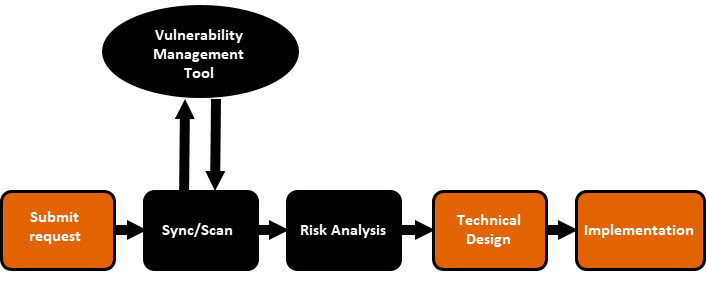
You can use SecureChange's external risk analysis feature to integrate an Access Request Workflows with a third-party vulnerability management tool, allowing you to utilize existing solutions to enhance your risk analysis capabilities. This integration is handled by Vulnerability-based Change Automation App (VCA), which runs a script that either retrieves the vulnerability historical data (sync) or starts a new scan in the third-party vulnerability management tool - depending on the setting you select in the app.
To create the integration, in the SecureChange Access Request workflow:
- Create a step for syncing/scanning with the third-party management tool.
- Create a Risk Analysis step. The Risk Analysis can run either automatically or manually.
The step for syncing/scanning with the third-party vulnerability management tool needs to be before the Risk Analysis step, preferably immediately before the Risk Analysis step. This is going to be the integration point between SecureChange and the third-party vulnerability management tool.
After, you create the Access Request workflow, you will need to add an integration in VCA. Once the integration is created, VCA will add a script to the Access Request Workflow.
When the ticket arrives at the integration point, SecureChange runs the script, which automatically does the following:
-
Retrieves the vulnerability historical data or start a new scan in the third-party vulnerability management tool.
-
After the vulnerability data is retrieved, advances the workflow to the next step.
-
If the Risk Analysis step is automatic, when the workflow reaches this step, the script generates a report with the data that was previously retrieved. This report can be viewed in the Risk Analysis tab, and it is also sent back to VCA.
For more information, on third-party risk analysis, see Configuring third-party risk analysis.