On This Page
Reviewing Rule and Device Vulnerabilities
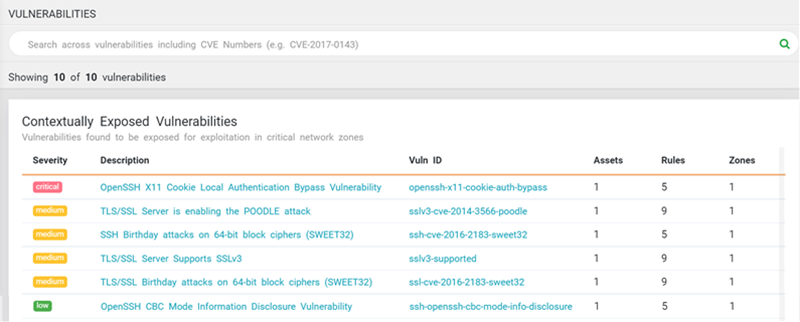
The Vulnerability ( ) menu displays vulnerabilities that the Vulnerability Mitigation App (VMA) finds for all rules and devices that it scans. This menu shows the following information:
-
Severity of the vulnerability
-
Description of the vulnerability. Click a description to open the Vulnerability Information window.
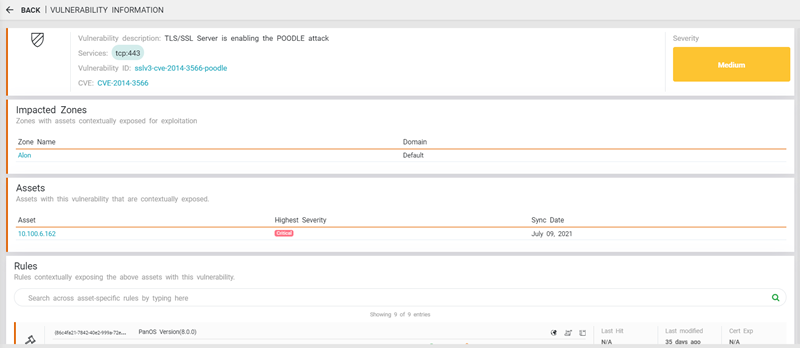
In the header section, you can see description, services, ID, and the related Common Vulnerabilities and Exposures (CVE) ID number. CVE is a database of publicly-disclosed security issues; the CVE number uniquely identifies a vulnerability.
Additional sections include the zones, assets, and rules affected by the selected vulnerability.
Click Back to return to the Vulnerability tab.
-
Vuln ID link. Click this link to see a description in the vulnerability management system (VMS) that identified it.
-
Number of Assets, Rules, and Zones that are affected by the vulnerability.