On This Page
Overview
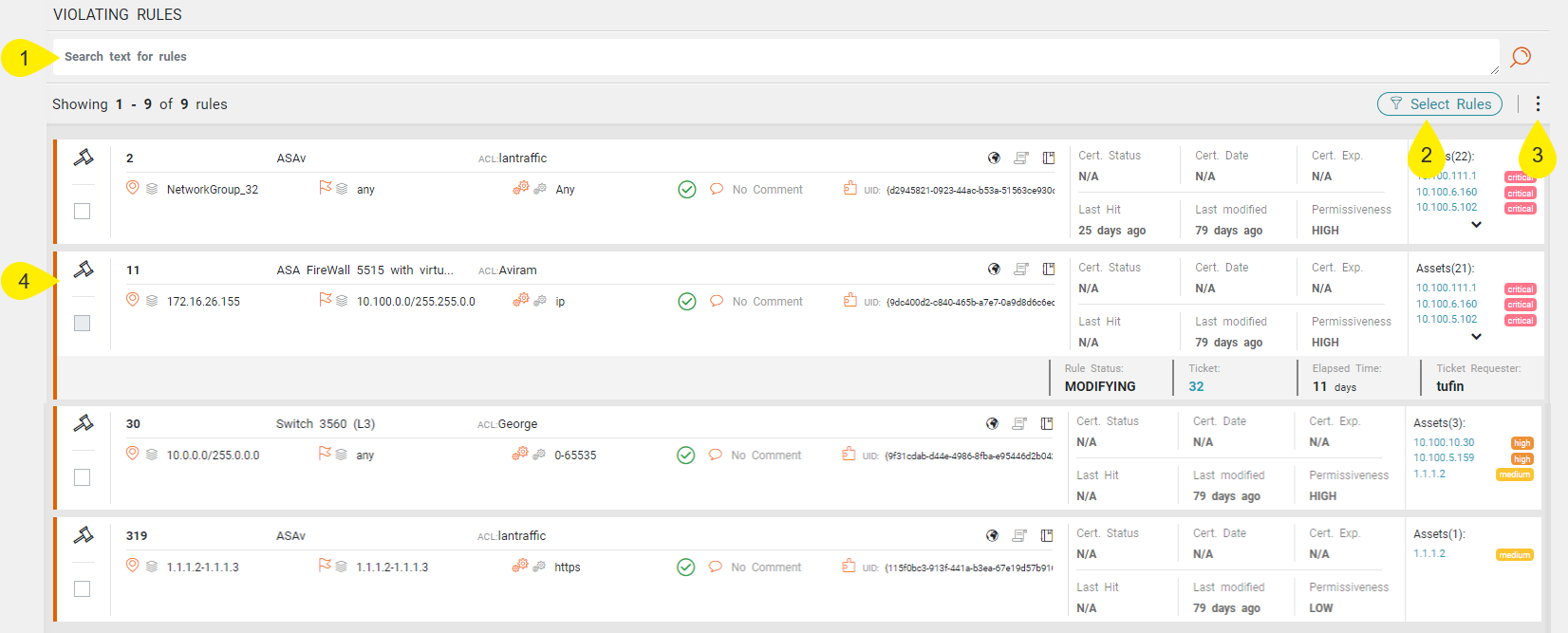
The detailed rule breakdown appears in the Rules ( ) menu, which provides you with much-needed information on the vulnerability details of the individual rules.
With this information, you can prioritize assets and rules for mitigation. From VMA you can mitigate assets by opening a Server Decommission request ticket in SecureChange. You can mitigate rules by opening a Rule Decommission request from the SecureTrack Policy Browser.
The extension correlates rules by the vulnerabilities’ services. Only rules that match the source or destination AND one of the services are considered vulnerable and correlated to VMA.
What Can I do Here?
The Rules menu offers the following features:
- Search field for filtering the rules table according to the details of specific rules. You can perform searches using free text.
- The Select Rules menu filters rules that match either or these options:
- Show Rules with ANY Object: Display rules with ANY object assigned to a firewall that is not the asset's firewall.
- Exclude Rules with ANY Object: Exclude rules containing ANY object that is assigned to a firewall that is not the asset's firewall.
- Using the actions (
 ) menu, you can:
- Change rule by Rule Modification: Select a rule to change and select this option. VMA opens a Rule Modification workflow in SecureChange. The status of the rule changes to Modifying. After the rule is changed, VMA checks the rule to see if it is still vulnerable. If not, VMA removes it from the list.
- Download as CSV: Download the rules table as a CSV file.
- Rules table listing all the rules containing services that can be used to exploit the vulnerable asset. The table includes the following information for each rule:
Rule UID
Rule name
Source
Destination
Affected services
Rule action
Comments
Zones
Domain
Logs
Rule metadata including Last hit, Last modified, Expiration date, Permissiveness level, Shadowed, and Violations count
Assets exposed by rules, sorted by severity