On This Page
Overview
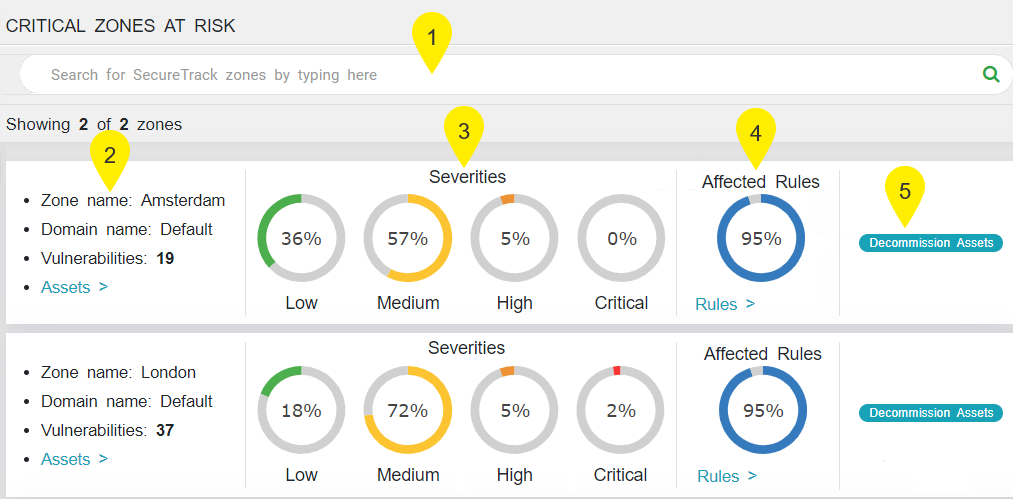
You can use the detailed breakdown of critical network zones in the Zones ( ) menu to review the context and visibility regarding the exposure status of the assets in each zone.
The Zones menu offers the following features:
- Free text search: In this field, you can filter the list of zones displayed by entering free text with the name of a zone or the IP address of an asset.
- Zone information: For each zone, you can view the zone name, domain name and number of vulnerabilities detected in the zone.
- If you click on the Assets link, you can view the assets located in the zone.
- If you click on the link in the IP address of the asset, you can view the Asset Profile page which contains a detailed profile of the asset that includes:
- Additional details on the asset - number of network-based vulnerabilities detected, name and severity level of the vulnerability management system, and synchronization date
- Vulnerabilities by severity type for that asset
- Percentage of exploitable rules in asset from all exploitable rules detected
- List of critical network zones in which the asset is included
- List of network-based vulnerabilities detected in the asset with a link to additional information in the vulnerability management system's database.
- List of devices linked to the vulnerable asset
- List of exploitable rules with access to the asset
- Severities: In this section, you can view a breakdown of network-based vulnerabilities by severity in the asset.
- Affected Rules: In this section, you can view the percentage of exploitable rules in asset from all exploitable rules detected.
- If you click on the Rules link, you can view the Rules page that contains a detailed list of all exploitable rules with access to the asset:
- The list can be downloaded as a CSV file.
- Decommission Assets: If you click on this button, you can open a server decommission ticket in SecureChange. This feature is also available in the Asset Profile page and Rules menu.